Insights and usage
The Insights dashboard shows what your agents have processed and shipped, computed entirely from your local database. Open it from the chart icon in the top bar (the Insights tab on mobile). Everything on the page is local: no repository content or transcript leaves your machine to produce it.
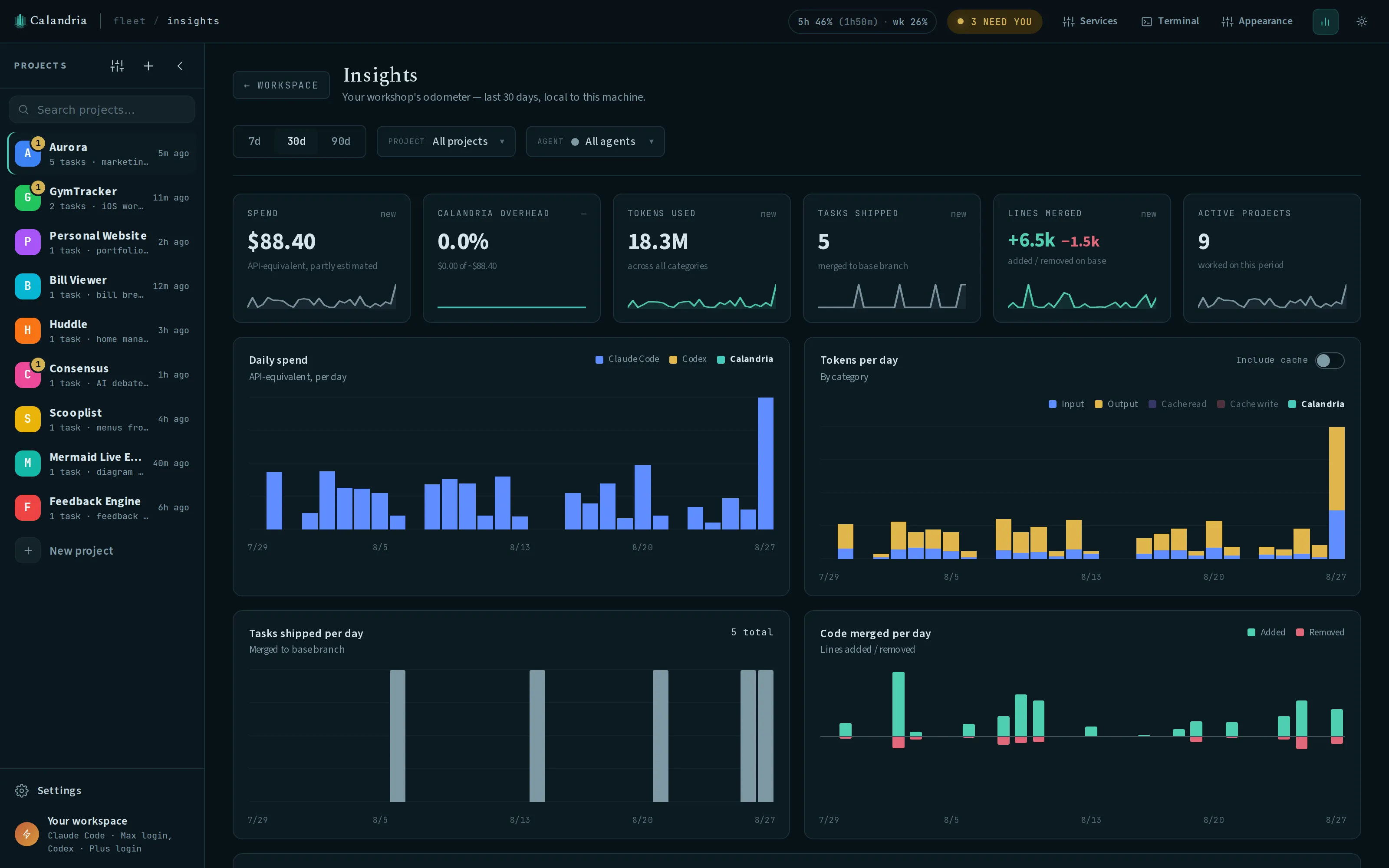
Filtering the dashboard
Three controls apply to almost every panel:
- Range: 7, 30, or 90 days, always ending today.
- Project: narrows every panel to one project. Clicking a row in the Projects table sets this filter too; click it again, or the “clear project” pill, to reset it.
- Agent: narrows to one connected agent (Claude, Codex, and so on) or “All agents.”
If you’ve used Calandria for under 7 days, a banner names how many days of activity actually feed a 30- or 90-day view, since an average over the full range would otherwise look diluted.
Reading the marks
A few symbols repeat across the dashboard:
~on a dollar figure means it’s an estimate, not a bill: either the agent (Codex) reports tokens only and Calandria multiplies by published API prices, or the turn ran on a Max/Pro/ChatGPT subscription login, where the figure states what the tokens would have cost at API prices instead of a charge. Under an API key the figure is a real charge instead: Claude reports its SDK dollar figure directly, so only a subscription login or a token-only agent produces the~estimate.≈means the figure came from a LiteLLM gateway’s own price table. See By provider.- A raised
+after a dollar figure means some turns in that total had no price at all: they ran against a custom endpoint nobody has told Calandria the cost of, so the total leaves them out instead of counting them as $0. Hover the figure for the exact turn count.
Overview numbers
Six cards summarize the current range, each with a sparkline and, except Active projects, an arrow comparing the total to the immediately preceding period of the same length (last 30 days versus the 30 before that, for example):
| Card | What it counts | What it excludes |
|---|---|---|
| Spend | API-price-equivalent cost of task turns in range, marked ~ if every visible agent’s cost is estimated | Calandria’s own convenience-job spend (see below) |
| Calandria overhead | Convenience-job spend as a percentage of total spend (tasks + convenience jobs) | n/a |
| Tokens used | Input, output, cache-read, and cache-write tokens across all task turns in range | Tokens burned inside a subagent’s own context window (see Per-task usage) |
| Tasks shipped | Tasks whose work merged to base in range (a local merge or a merged/reclaimed PR) | Tasks marked done without merging, and tasks still in progress |
| Lines merged | Lines added and removed by merges landed in range, from each merge’s own diff stat | Net repository size; a reverted change counts as its own addition and removal when it lands |
| Active projects | Distinct projects with any spend, tasks, or merges in range | Projects with no activity in the window, even if they exist |
Daily charts
Four stacked-bar charts break the same range down by day, each with a crosshair: hover a day for its exact breakdown.
Daily spend stacks one series per agent plus, unless you hide it from the legend, Calandria’s own convenience-job spend. Hiding it from the chart doesn’t change the Calandria overhead card above, which always covers the full period.
Tokens per day defaults to input and output tokens only. Flip “Include cache” to also stack cache-write and cache-read tokens, since cache reads routinely dwarf the tokens actually processed for the first time and can make a normal day look alarming by default.
Tasks shipped per day counts the same merges as the Tasks shipped card, by day.
Code merged per day plots lines added above the baseline and lines removed below it, from the same merges as the Lines merged card.
Calandria’s own usage
A table of Calandria’s convenience jobs: /clear handoff summaries, project recaps,
“Refresh with AI” context drafts, tag refreshes, and agent-connection verification. Each row
shows the runs, tokens, total cost, and cost per run for that job type in the selected range,
plus which project(s) it ran for and which model it actually ran on. A job run before model
recording shipped, or by a driver that can’t report one, reads “model not recorded” but still
counts toward the row’s runs and cost. A job left on Inherit still reports which model it
actually ran on. A “Settings →” link on each row jumps to where you’d change it: the
background-jobs switch, the model picker under Run defaults, or Settings → Models. Your task
chats never appear here.
Settings also shows the last 30 days of this same utility-job activity, with the models behind it, and lets you turn off unattended background work entirely.
By provider
Total task spend broken down by connected agent: spend, tokens, tasks, and the model(s) each one
ran. A project routed through the Gateway model-provider preset (a LiteLLM proxy) shows its
figure with ≈ instead of ~, and adds a Cache hit column, shown only once any gateway
turn exists in range: cache-read tokens over input tokens for that provider’s gateway turns.
A rate stuck near 0% despite real input tokens usually means prompt caching is failing silently
somewhere in the gateway’s translation layer, since a proxy that drops the caching hint won’t
report the failure itself.
A turn that exceeds the gateway key’s budget is a recoverable failure with its own Retry button, the same way a dead login or a spent usage limit is.
Cross-checking a task against LiteLLM’s own logs. Every gateway request carries
x-litellm-tags naming the project, task, and agent, enough to filter LiteLLM’s own spend views
to one task by hand. For a Claude task there’s an exact join: Claude Code sends
x-claude-code-session-id on every request, and LiteLLM records that same value as the spend
log’s session ID. Filtering LiteLLM’s /spend/logs (or its UI) by that session ID gets you that
session’s exact per-call cost, cache breakdown, and any upstream errors, the ledger the ≈
estimate here is standing in for. LiteLLM’s /spend/logs has no tag filter of its own
(BerriAI/litellm#14218), so the tags give you coarse filtering across a project, task, and
agent, and the session ID gives you an exact match on one session.
The Gateway titlebar pill shows the gateway key’s own spend, budget, and reset time when the proxy has a database behind it. Without one, the Gateway pill is absent. Settings → Models shows whether the provider is reachable and how many models it serves.
Projects
Every project with activity in range, sorted by spend. The agent filter applies here; the project filter doesn’t, because clicking a row IS the project filter. Each row shows spend, tokens, tasks shipped, lines added/removed, when the project was last active (day resolution), and a spend sparkline over the range.
Tags
Shown only once at least one tag has spend. Unlike Projects, both the project and agent filters apply, and a task’s spend counts toward EVERY tag it carries: a task tagged with three features appears in all three rows, so this column doesn’t sum to the Projects table above it. Usage from an untagged task, or one since deleted, is left out entirely; it isn’t pooled into a catch-all row.
Per-task usage
A task’s own header carries a compact usage chip once it has any recorded usage, such as
250k tok · 3.5M cached · ~$4.20. Hover it for the exact breakdown.
| Part | Meaning |
|---|---|
250k tok | Input, output, and cache-write tokens: everything processed for the first time this task |
3.5M cached | Cache-read tokens, usually the conversation so far being resent and reused on later turns |
~$4.20 | The same price-equivalent or estimated figure described in Reading the marks |
Both token figures cover the main session only. When a turn fans out to subagents, each one runs in its own context window, and the driver reports those tokens separately from the session that launched them. The tooltip states the subagent share on its own line (“1,200,000 of those in subagents (their own windows, not this session’s context)”) and adds it to the grand total it shows, so the tokens and the dollar figure describe the same work; the dollar figure already includes subagent cost even though the two headline token counts don’t. An agent that doesn’t report the subagent split omits that line instead of claiming zero.
A turn you stop is billed for whatever it already ran, so it’s still recorded: its tokens come from the model requests it actually made, not the end-of-turn total it never produced, and it carries no dollar figure, the same way a turn against a custom, unpriced endpoint doesn’t. Its tokens still count toward the task and the project; the dollar figure beside them is a floor.
Plan usage meter
On a Claude Pro/Max, ChatGPT, or Antigravity subscription login, the titlebar shows a compact meter: current session (5-hour) and week utilization, plus time left before the session window resets. Click it for the full breakdown: every window the provider reports (including per-model weeks for Claude), reset times, and how fresh the data is. It tints amber at 80% utilization and red at 95% or once a limit is actually reached. Connect more than one metered agent and you get a pill each, distinguished by its brand mark; the tooltip and breakdown name the agent in full. If your LiteLLM gateway key has a budget configured, its spend-to-budget ratio gets its own “Gateway” pill using the same meter.
Each metered bundled provider in Settings → Models has a Titlebar usage switch on its Connection tab. Hiding one only affects the titlebar. The server still reads and records its usage.
Percentages are read conservatively: only while a tab is open, and only refetched from the
provider at the floor in the table below, serving the cached value in between and backing off on
failure. For Claude that read rides the same usage endpoint the CLI’s own /usage panel uses,
topped up for free by the rate-limit telemetry every turn already carries, so an approaching or
reached limit can show up before the next scheduled poll. Codex’s turn stream carries no such
telemetry, so its figures come only from that periodic read and can be one interval old. The
meter doesn’t render at all under API-key auth, since there’s no plan to meter.
A project can also point one agent’s turns at a different endpoint instead of its own login, with
an ANTHROPIC_BASE_URL, OPENAI_BASE_URL/CODEX_OSS_BASE_URL, or GOOGLE_GEMINI_BASE_URL
override, and the meter accounts for that, counted per agent across your non-deprecated projects.
If every project redirects an agent, its pill disappears entirely: every percentage in it would
describe turns the instance never runs, and the per-task “resume when your usage window resets”
offer goes with it, since it reads the same snapshot. If only some projects redirect the agent,
the pill keeps its numbers, which stay true about the plan, and its popover adds a line naming how
many projects point the agent elsewhere. If no project redirects the agent, the meter is
unchanged. Settings → Agents shows the same split as a line under the connected account, so
Settings and the meter never disagree; the login itself still reports as connected and Reconnect
still works, since a project override doesn’t invalidate your credentials. A gateway endpoint
counts as redirected too, with one exception: Claude with CALANDRIA_GATEWAY_BILLING: "subscription" still spends the plan, since that setting forwards the turn to your own
subscription login instead of billing the gateway’s key. Deprecated projects aren’t counted
either way.
Settings and environment variables
| Name | Default | Effect |
|---|---|---|
| Settings → Background jobs → “Let Calandria use your agent for background work” | On | Off stops unattended recap, context-draft, and tag-refresh jobs; explicit /clear, Refresh with AI, and a manual recap refresh still run |
| Settings → Background jobs → Project recaps | Automatic | Automatic / Only when I open a project / Off |
| Settings → Background jobs → Utility agent | Falls back through the app default agent | Which connected agent runs Calandria’s own convenience jobs |
| Settings → Models → bundled provider → Titlebar usage | On | Off hides that environment’s meter pill only |
CALANDRIA_PLAN_USAGE | on | Set to off to hide the plan usage meter entirely and stop polling every provider for it |
CALANDRIA_PLAN_USAGE_MIN_FETCH_MS | 300000 (5 minutes) | Minimum time between live plan-usage reads per provider; cached value serves requests in between |
Data handling
Every figure on this page is computed from your local SQLite database, and filtering happens in your browser. No task transcript or repository content is uploaded to produce it.